Raspberry Pi - Custom SSH MOTD Banner
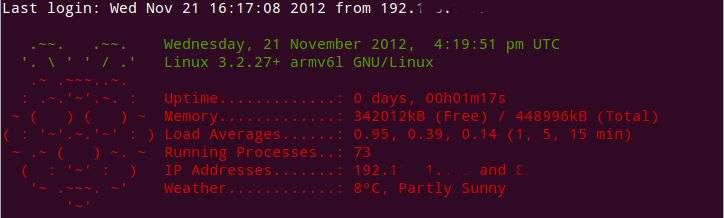
Once you login to a device via SSH the first thing you'll be presented with is a banner of text. This is the MOTD (Message of The Day) and can actually be set to any text that you want.
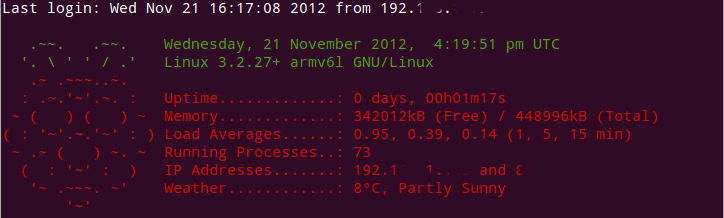
You can even go a step further as we will in this guide, and make elements of the banner dynamic, so that you're able to display useful information when you login, such as the:
- System Uptime
- Memory Consumption
- Load Average / CPU Usage
- Networking Info such as IP Address
Theres a great post on the Raspberry PI forums, where someone has created the below dynamic banner for each time that you login, which we will be using here as an example.
Perhaps one day this might get included into the standard operating system, but if you can't wait like me it's fairly simple to get it installed.
Install a Custom MOTD
The first step is to edit your bash profile, we'll do this using the text editor "nano" and also prefix this with "sudo" to ensure we have the required permissions.
sudo nano /home/pi/.bash_profile
Once open you can simply paste in the code below, anywhere within that file. When you are done just press "CRTL + X" to close the file, and when prompted press "Y" to ensure your changes are saved.
let upSeconds="$(/usr/bin/cut -d. -f1 /proc/uptime)"
let secs=$((${upSeconds}%60))
let mins=$((${upSeconds}/60%60))
let hours=$((${upSeconds}/3600%24))
let days=$((${upSeconds}/86400))
UPTIME=`printf "%d days, %02dh%02dm%02ds" "$days" "$hours" "$mins" "$secs"`

# get the load averages
read one five fifteen rest < /proc/loadavg

echo "$(tput setaf 2)
.~~.   .~~.    `date +"%A, %e %B %Y, %r"`
'. \ ' ' / .'   `uname -srmo`$(tput setaf 1)
.~ .~~~..~.
: .~.'~'.~. :   Uptime.............: ${UPTIME}
~ (   ) (   ) ~  Memory.............: `cat /proc/meminfo | grep MemFree | awk {'print $2'}`kB (Free) / `cat /proc/meminfo | grep MemTotal | awk {'print $2'}`kB (Total)
( : '~'.~.'~' : ) Load Averages......: ${one}, ${five}, ${fifteen} (1, 5, 15 min)
~ .~ (   ) ~. ~  Running Processes..: `ps ax | wc -l | tr -d " "`
(  : '~' :  )   IP Addresses.......: `/sbin/ifconfig eth0 | /bin/grep "inet addr" | /usr/bin/cut -d ":" -f 2 | /usr/bin/cut -d " " -f 1` and `wget -q -O - http://icanhazip.com/ | tail`
'~ .~~~. ~'    Weather............: `curl -s "http://rss.accuweather.com/rss/liveweather_rss.asp?metric=1&locCode=EUR|UK|UK001|NAILSEA|" | sed -n '/Currently:/ s/.*: \(.*\): \([0-9]*\)\([CF]\).*/\2°\3, \1/p'`
'~'
$(tput sgr0)"
Source: http://www.raspberrypi.org/phpBB3/viewtopic.php?t=23440